CSS & Projects

Projects, Scrum, Trello & Code

Quote From Mike Monteiro

A good designer finds an elegant way to put everything you need on a page. A great designer convinces you half that shit is unnecessary. — Mike Monteiro

I just needed to write this awesome quote somwhere so I can see it again from time to time. Also, you may like it too :–)

I found the quote in heyimcat’s blog, on a article called “It’s called ship, not Shit. Nice title!

CSS Namespacing and Efficiency

So you may think everything is all-good-thumbs-up when you write .foo div because there are only a few .foos, but actually you are asking the browser to look up all the tens of millions of divs first, then all the .foos and exponentially more with more descendant selectors. Yipes. For more, check out the CSS Tricks article about efficiently rendering CSS.

From : Trello’s blog : refining the way we structure our CSS

The -Must Read- CSS-Tricks article mentionned : CSS-Tricks : Efficiently rendering CSS

CSS Without Classes : The Attributes Module

Yesterday, Glenn Maddern introduced a new concept for styling HTML websites : the Attributes Modules. His explanation being very thorough and well-written, you should read it first.

I used it today for a small pen about language learning card :

The HTML uses attributes (starting with am-attribute so I know it’s part of this module, it’s very much like Angular’s ng-stuff) instead of classes.

The code :

Here I have three modules :

  • Card : am-Card to style Cards in general
  • Lang : am-Lang to make sure the user can recognize pinyin (latin-characters chinese) at a glance for example.
  • Question : am-Question, which will hide and show blocks of text, so the user has to guess them.

The HTML template for my Card :

1
2
3
4
5
<article am-Card>
  <p am-Lang="chinese"><em am-Question="hidden"></em>一个铁剑。</p>
  <p am-Lang="pinyin"><em am-Question="hidden"></em> yī ge tiě jiàn.</p>
  <p am-Lang="english">I <em am-Question="none">sculpt</em> one iron sword</p>
</article>

The CSS I use :

1
2
3
4
5
6
7
8
9
10
11
12
13
14
15
16
17
18
19
20
21
22
23
/* CARD module */
[am-Card] {
  /* Basic CSS stuff about Cards*/
}

/* QUESTION module */
/* stuff about Questions that won't change if I apply a modifier */
[am-Question] {
  font-style: inherit;
  border-radius: 0.1em;
}
/* Questions with "shown" state will have a sliiight background color
   to know it's been revealed */
[am-Question~="shown"] {
  background-color: rgba($color-hidden, 0.3);
  transition: all 0.1s ease-in-out;
}
/* Questions with "hidden" state will have the same background-color
   and color to hide them ! I'm quoite proud of this trick :P */
[am-Question~="hidden"] {
  color: $color-hidden;
  background-color: $color-hidden;
}

Pro’s and Con’s

  • You never have to worry about two .hiddenclasses with different behaviors.
  • You won’t have huge Card__Question--hidden classes like BEM does, because each module has its own attribute (avoids Global Namespace !).
  • Since all your attributes have meaning, I think we can use the same attributes for CSS and JS. The attribute only shows an information, CSS and JS can do whatever they want afterwards.
  • But it’s not very pretty to have [am-Question~="shown"] everywhere in your css…

The full Pen :

See the Pen Hide some text by Pierre (@Marekje) on CodePen.

Start of a Design Workflow

Plan

When you get a new assignement for a design work, talk about it with its Product Owner. He will always have ideas and insights, data, people you should talk to…

Do

Then, write down your first ideas, sketches, make a basic report with the “State of the art”, existing functionalities and dreamed ones… It will help you define what your design needs to work.

Check

Do you have all your design functionalities ? Do you know who’s the final user ? Is there a hidden product owner somewhere you haven’t talked to (You know, your boss’s boss) ?

Act

At this point, define if you can start the actual designing work or if you need more informations.

For more generic informations : –> (PDCA : The Deming wheel) [http://en.wikipedia.org/wiki/PDCA]

A Smooth Buttons System in CSS

I’ve made a system of buttons for an application I’m creating right now. I don’t dislike flat design, but it always bugged me that buttons would be so… bland.

So I’ve made a simple buttons system easy to improve so I can add what I need later on:

See the Pen Smooth buttons system by Pierre (@Marekje) on CodePen.

The github Gist : Gist

On Web Typography : Excerpts

Jason Santa Maria wrote a book called On Web Typography. I’m reading it and adding here the stuff I want to remember.

The CSS em

“The em is the available height of each character’s canvas” (page 28)

Okay, how does line-height: 1em looks like then ?

body {
  background-color: #eee;
}
p {
  font-family: Verdana, sans-serif;
  font-size: 3rem; //set the 'em' default
  max-width: 10em; //I make sure I have at least two lines
  line-height: 1em;
}
span {
  background-color: rgba(0, 0, 0, 0.3);
  outline: 1px solid rgba(0, 0, 0, 0.1);
  border-radius: 3px;
}

See the Pen What is a 1em line-height ? by Pierre (@Marekje) on CodePen.

So, line-height: 1em means that a q with a l under are going to touch each other.

What does font-weight: 400 means?

See the Pen What does `font-weight: 400` means ? by Pierre (@Marekje) on CodePen.

Hey, Helvetica has three weights ! One for titles, one for text and one for emphasis, which means I could make an entire website with it. Maybe it overused though…

On page 51, Santa Maria tells us he likes Chaparral. Lets look at it !. Woaow, four weights ! 300, 400, 600 and 700. Plus, I really like its feeling…

How to choose a font :

  • Type for a moment

    For navigation or interface text, I look for typefaces that hold up well at small sizes. [A] simple sans serif. [he promotes] JAF Facit.

  • Type to live with

(The screenshot on page 63 is a gorgeous page of text !)

Typefaces for longer reading should give a page an even texture (p62)

–> Not too much personality, specific features that sets the font apart from it peers.

“Sufficient x-height”
“Low or medium contrast”
“recognizable and distinct letterforms”

–> For body text, use a high x-height, it gives more space to the character, thus giving more space to convey the information (the letter shape).

–> Use lowercase numerals, because they integrate better with the text. Uppercase numerals would look like bold text.

  • Methods for choosing typeface

Word association, comparison of real text, appropriateness

Proxima Nova’s straight lines contrast perfectly with the Mighty logo’s script lettering.

–> fontsinuse.com A website showing diverse fonts in the real world (even some chinese characters !).

Avoid ready-mades. (p.74)

Be careful with free fonts. (p.75)
Octopress/Github Pages : Create a New Blog Post

Open your terminal :

  • cd Sites/marekje.github.io //use tabs to go faster

  • rvm install ruby-2.1.1 –> because my computer always seems to go back to an older version. It will tell it’s installed, that’s normal

  • rake new_post['The name of your brand new Post']

Open a new terminal tab :

  • jekyll serve –> useful to see your post in local. follow their instructions. Open a new terminal tab
  • rake generate –> each time you want to see your local blog post.

  • Put categories & write your post.

When it’s ready :

  • rake generate
  • rake deploy –> It will ask for your github username/password.
  • It’s on the web !

That’s all :–)

Easy Card Sizing for Different Uses

When they learn a language by themselves, most people use paper or cardboard cards for easy vocabulary learning. They go through them as often as possible, trying to find systems to see them nore often when they don;t know it, and less often when it’s in their long-term memory.

Today, computer softwares like Anki or Memrise do it for you, using Spaced Repetition System (look it up).

But that’s not today’s point. Sometimes you want to see cards one by one so you can learn them from your phone in a moving subway, other times all of them on your huge desktop screen to sort through them.

So I needed a way to easily change the cards size without much code :

See the Pen Cards & Sizes by Pierre (@Marekje) on CodePen.

Look at the three first lines of CSS : That’s all you need, the whole card changes according to that setting !

Design Pendant Un Sprint

Je me demandais comment gérer le design manquant durant un Sprint. les modifications dues au développement, aux nouvelles idées, aux problèmes techniques.. font que le design d’un projet change au fur et à mesure du temps. J’ai donc eu besoin de trouver et développer une méthode pour intégrer le design dans un sprint normal, et le faire évoluer au même rythme que le développement, par itérations successives. Et je l’écris ici pour ne pas l’oublier !

2 étapes

Avant le début du développement, il faut :

  • Une “Charte graphique”, document qui contient les couleurs et leur usage (background, texte, titres, alertes, légendes…), les polices de paragraphe, titre, lien… , les textures, le rendu attendu en fonction des endroits (menus, articles, widgets…).

Chaque exemple comprend un graphisme, une explication de l’objectif du graphisme et des endroits auquels il est attendu , ansi que le CSS nécessaire (grâce à une mixin SCSS/LESS si possible)

  • Une “Charte des Interactions”, qui décrit les principales possibilités d’action des utilisateurs lors de l’utilisation de ce projet, étape par étape.

Chaque exemple comprend un workflow de l’interaction et ses transitions, une explication du résultat attendu par l’utilisateur et le code basique nécessaire pour faire fonctionner l’interaction si possible.

  • Une “Charte Technique” décrivant les langages, librairies et technologies front-end & back-end utilisées.

Pendant le sprint, on commence par un Sprint Planning Meeting qui décrit les tâches à réaliser par l’équipe. C’est durant cette phase que tout se joue.

  • Les tâches qui ont besoin d’un redesign ou d’une description plus complête vont être assignées au designer, qui va créer un document explicatif rapide pour chacune, l’ajouter sur la tâche, puis les assignera aux développeurs par la suite.

  • Le designer va regarder les autres tâches, et y noter les documents de design utiles pour la réalisation de la tâche.

De cette manière, un développeur pourra se référer uniquement au descriptif de la tâche pour réaliser son travail !

Qu’est-ce que ça donne concrètement ?

J’utilise Trello, qui permet de faire ça facilement :

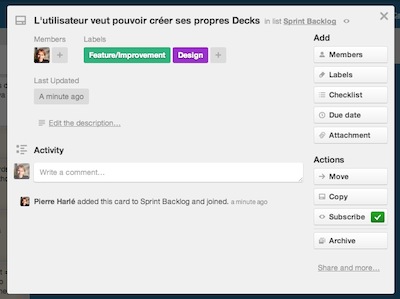
La Card assignée au Designer :

une Card Trello avant que le designer n'y ajoute sa patte

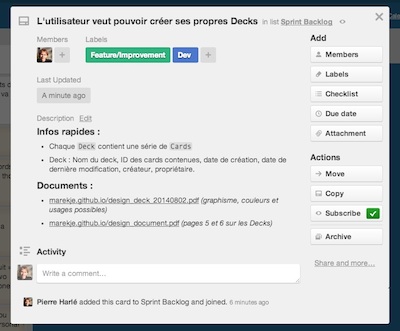
La Card une fois le designer passé : (notez le changement de [design] à [dev])

une Card Trello après le passage du designer